


Network FAQ's
Network FAQ's
VPN
A VPN (short for virtual private network) is a simple tool that helps keep you safer and more private online. Whether you’re at home, at work, or using public Wi Fi, a VPN hides your real IP address and protects what you do on the internet. An easy way to picture it: a VPN is like a private tunnel for your internet traffic. Anything you send or receive goes through that tunnel, so outsiders can’t easily see who you are or what you’re doing. The primary network equipment used to create a Virtual Private Network (VPN) is a VPN-enabled router, firewall, or dedicated VPN gateway/concentrator. These hardware devices, often placed at the edge of a network, encrypt, decrypt, and route traffic to securely connect remote users or branch offices to a private network.
What Does a VPN Actually Do?
When you turn on a VPN, it scrambles (encrypts) your data before it leaves your device. That data travels securely through the VPN’s server, then gets unscrambled so websites can understand it. Think of it like sending a secret message. You write it in code, send it, and only the person with the decoder can read it. If someone tries to intercept it along the way, all they’ll see is nonsense. The same thing happens with data coming back to you—it’s encrypted first, then unlocked on your device. Without a VPN, your internet traffic can be seen by your internet provider or anyone snooping on the network. Your IP address can also be tracked, which may reveal your location or identity.*Keep Your Browsing More Private
Your internet service provider (ISP) can see the websites you visit and how long you spend online. In some cases, that data can be shared or sold to advertisers. A VPN helps block your ISP from seeing your activity, giving you more privacy and peace of mind.
Public Wi Fi at airports, cafes, or hotels is convenient—but it’s also risky. Many of these networks are open, which makes it easier for hackers to spy on connections. Using a VPN on public Wi Fi hides your activity and encrypts your data, so even if someone is lurking on the same network, they can’t easily steal your information.
*Stop Businesses From Tracking You
Many stores offer free Wi Fi or apps with special deals. The trade off is often your data. A VPN helps limit how much information businesses can collect about you while you shop, browse, or use their apps.
*Protect Work and Company Data
With more people working remotely, security matters more than ever. A VPN helps protect company files and sensitive information when employees connect from home or public locations.
*Access Blocked or Restricted Content
A VPN can make it look like you’re browsing from a different location. This can help you access websites or media that may be blocked where you live. For example, streaming services often show different content in different countries. A VPN can sometimes let you see shows or movies that aren’t available in your region.
How a VPN Works
A VPN routes your internet connection through a private server instead of directly through your ISP. Because your data goes through this secure tunnel, websites and third parties see the VPN’s IP address—not yours.
How to Use a VPN
Using a VPN is usually very easy:
1. Sign up with a VPN provider
2. Download their app on your phone, tablet, or computer
3. Log in and choose a server location
4. Tap or click “Connect”
2. Download their app on your phone, tablet, or computer
3. Log in and choose a server location
4. Tap or click “Connect”
Once connected, you can use the internet like normal—just with extra privacy and security. You can disconnect or switch locations anytime from the app.
Bottom line: A VPN is a simple way to protect your data, keep your browsing more private, and gain more freedom online—without needing to be tech savvy.

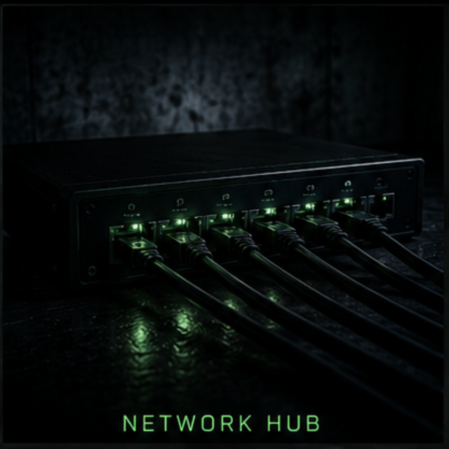
HUB
What is a HUB (Dummy Switch)
A network hub is a basic networking device used to connect multiple computers or other network devices together within a Local Area Network (LAN). It operates at Layer 1 (the Physical Layer) of the Open Systems Interconnection (OSI) model, which means it simply receives data from one connected device and broadcasts (sends) that data to all other devices connected to it. A hub does not filter, manage, or direct traffic intelligently — it does not know where the data is supposed to go. Instead, every device connected to the hub receives the transmitted data, and only the intended device processes it while the others ignore it. Because of this broadcast behaviour, hubs can cause unnecessary network traffic and data collisions, especially as more devices are added.Hubs are typically used in very small, simple, or temporary networks where advanced traffic management is not required. For example, in a small lab environment, home office, classroom setup, or basic testing network, a hub can be used to quickly connect multiple computers or alternative devices together so they can communicate. However, in modern networks, hubs have largely been replaced by network switches, which operate at Layer 2 (Data Link Layer) and intelligently forward data only to the correct device, improving performance and security at a higher price point. While hubs are inexpensive and easy to use, they are rarely used in professional environments today due to their inefficiency and lack of security features.
Where Would a HUB Come in Handy
In a home, home office, or a classroom, a 5, 8, or 16 -port network hub can be used to expand the number of wired devices connected to a single network. The hub acts as a central connection point, repeating any incoming data signal from one device to all other connected devices allowing multiple devices to communicate, reach the internet, or talk to each other via an Ethernet cable.
Router
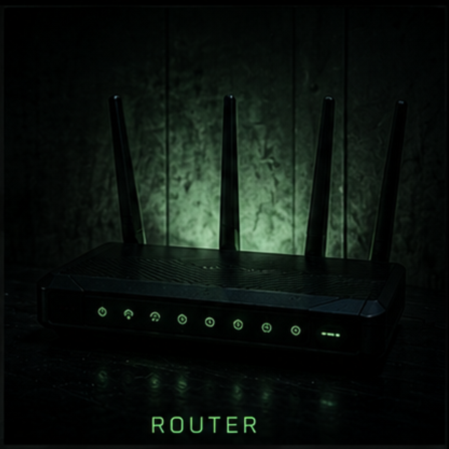
What is a Router?
A router is a device that sends and receives data across a network. People often mix routers up with modems, hubs, or switches, but routers can work with — or even replace — some of those devices. Their main job is to connect networks and help devices get online, whether that is at home or in a business.
How Routers Work
Routers move information around using small chunks of data called packets. These packets can contain things like files, messages, emails, or simple web requests. Each packet includes details such as who sent it, what kind of data it contains, how big it is, and where it needs to go. The router reads this information and decides the fastest, most efficient path for the data to take. It does this constantly, behind the scenes, to keep everything running smoothly.
How Routers Help Your Business
Routers are a core part of modern business networks. They connect employees to each other, to internal systems, and to the Internet — where communication, collaboration, and research all happen. They also help with security. Many routers include built-in firewalls and content filtering that block unsafe or unwanted websites without slowing things down. On top of that, most routers can do more than just connect you to the Internet. Many allow you to plug in external drives for file sharing or connect printers so everyone on the network can use them.
Types of Routers
*Core Routers - These are heavy-duty routers used by internet service providers and cloud companies like Google or Amazon. They handle massive amounts of data and connect large networks together. Small businesses usually do not need these, but very large organisations may use them across multiple buildings or locations.
*Edge Routers - Also called gateway routers, these sit at the outer edge of a network and connect it to the Internet. They are built for speed and data flow but usually do not offer Wi-Fi or local network management. Most have one Internet input and several Ethernet outputs.
*Distribution Routers - These routers take data from an edge router and deliver it to users. They usually provide Wi-Fi and Ethernet connections and are what most people think of as a “router” in an office.
*Wireless Routers - These combine edge and distribution router functions into one device. They’re common in homes and small offices. While ISPs often provide them, businesses may prefer higher-grade models for better performance, control, and security.
*Virtual Routers - These are software-based routers that run in the cloud. They’re popular with larger businesses that need flexible, scalable networking without managing lots of physical hardware.
How to Choose a Router for a Small Business
*Connectivity - Check that the router has the right number and types of ports for your devices. Extra ports aren’t a bad thing — they give you room to grow.
*Bandwidth - More users and devices mean more demand. A router with enough bandwidth keeps things fast and prevents slowdowns.
*Wireless Capability - Modern routers support Wi-Fi 6, which offers faster speeds and handles multiple devices better. It also works with older Wi-Fi devices.
*Easy Setup and Management - Many routers can be managed through a web browser, but mobile apps are becoming more common and are often easier to use.
*Security - Look for WPA or WPA2 protection at a minimum. Built-in firewalls, malware scanning, and MAC address filtering add extra layers of safety.
*Flexibility - Routers with Power over Ethernet (PoE) ports can power devices like phones, cameras, and access points without extra cables.
*Automatic Updates - Automatic firmware updates help keep your router secure and running well without manual effort.
*Custom Controls - Being able to manage traffic, guest access, and security settings — especially through an app — makes life much easier.
*Guest Networks - Guest Wi-Fi keeps visitors connected while protecting your internal systems and data.
*Quality of Service (QoS) - QoS tools let you prioritise important traffic, limit bandwidth hogs, and monitor usage across the network.
*Mesh Networking - Instead of using Wi-Fi extenders that create separate networks, mesh systems use multiple access points on one unified network. This gives better coverage and fewer connection issues, especially in larger spaces.
Switch
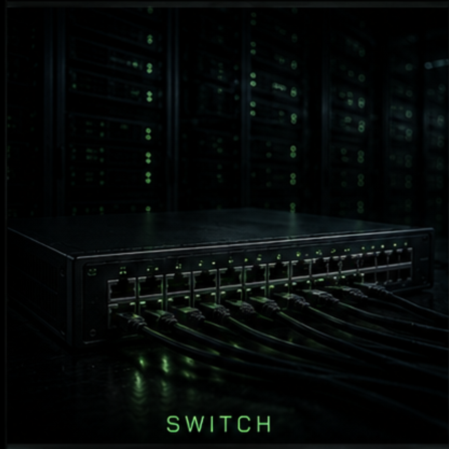
What Are Network Switches?
Network switches are devices that connect multiple wired devices within a network and help data move efficiently between them. They act as a central connection point, allowing computers, access points, IoT devices, and other equipment to communicate with each other. A switch works by receiving data packets and forwarding them only to the device they are meant for, using MAC addresses to determine the correct destination. This keeps network traffic organised and prevents unnecessary data from being sent to every device. Choosing the right network switch depends on factors like the size of your network, the features you need, your budget, and how much you expect the network to grow. Understanding these basics makes it easier to pick a switch that fits your setup now and in the future.
What is the difference between a Switch and a Router?
Routers direct data packets between different networks so they can reach their destinations. They connect multiple networks together and move data between them, such as local area networks (LANs), wide area networks (WANs), and autonomous systems that make up the Internet. In practical terms, routers are essential for accessing the Internet, while switches are mainly used to connect devices within the same network. Most homes and small offices only need a router unless they require many Ethernet ports. Larger offices, enterprise networks, and data centres with dozens or hundreds of devices typically rely on switches. Ethernet is a Layer 2 protocol used to transmit data through physical cables. Unlike Wi-Fi, Ethernet requires a wired connection.
What is a Layer 2 switch? What is a Layer 3 switch?
Network switches operate at different layers of the OSI model. Layer 2 switches function at the data link layer and forward traffic based on MAC addresses. Layer 3 switches operate at the network layer and forward traffic using IP addresses. Some switches can perform both functions. Most switches are Layer 2 switches. These commonly connect devices within a network using Ethernet cables, which plug directly into Ethernet ports on each device.
What is the difference between an Un-Managed Switch and a Managed Switch?
An un-managed switch simply adds more Ethernet ports to a local network, allowing additional devices to connect and access the Internet. It forwards data automatically using MAC addresses and requires no configuration. A managed switch is designed for larger networks and provides administrators with greater control over network traffic. Managed switches allow traffic prioritisation and support features such as Virtual LANs (VLANs), which divide a network into smaller, more efficient segments.
Firewall
A network firewall is a security system that protects a computer or network from harmful traffic on the internet. It works like a security guard, checking data that comes in and goes out, and blocking anything that looks dangerous.
The main purpose of a firewall is to prevent hackers, viruses, and other threats from getting into a network. It monitors traffic, filters data based on security rules, blocks unauthorised access, and can keep records of network activity. This helps keep personal and business information safe.
Types of Firewalls
Packet-Filtering Firewall - This checks small pieces of data and blocks or allows them based on simple rules.
Stateful Inspection Firewall - These are more advanced and tracks active connections.
Proxy Firewall - This acts as the middleman between users and the internet.
Next-Generation Firewall (NGFW) - This provides advanced protection, such as detecting complex attacks.
Hardware Firewall - a physical device that protects an entire network.
Software Firewall - This one is installed on a single computer.
Cloud-based Firewall - This option protects systems and users through the internet.
Packet-Filtering Firewall - This checks small pieces of data and blocks or allows them based on simple rules.
Forms of Firewalls
*Bottom Line - In short, a firewall is an important tool that helps keep networks safe by controlling and blocking harmful traffic.


Access Points
A Wireless Access Point (WAP or AP) is a networking hardware device that allows Wi-Fi enabled devices to connect to a wired network, typically via an Ethernet cable connected to a router or network switch. It acts as a bridge, extending network coverage to provide wireless internet access in homes, offices, or large, multi-story buildings. There are several types of wireless access points (APs), each designed for different environments and needs.
Standalone (fat) access points operate independently and are easy to set up, making them ideal for small offices, but they can be difficult to manage at scale.
Controller-based access points connect to a centralised wireless LAN controller, allowing streamlined management, stronger security policies, and easier scalability, though they require higher upfront costs and more complex setup.
Cloud-managed access points offered by companies like Cisco and Ubiquiti, allow remote configuration and monitoring through an online dashboard, providing flexibility and simplified management, but they depend on internet connectivity and may involve subscription fees.
Mesh access points wirelessly connect to each other to extend coverage without additional cabling, making them great for large homes or hard-to-wire spaces, though they may experience reduced speeds due to wireless backhaul.
Outdoor access points are weather-resistant and designed for extended range, ideal for campuses or warehouses, but they tend to cost more and require careful placement. Choosing the right access point depends on the size of the network, budget, management preferences, and performance requirements.
Key Aspects of Access Points:
• Function: Unlike a router that directs traffic, an AP receives data via a wired connection and converts it into a wireless signal, allowing multiple devices to connect to the network simultaneously.• Benefits: APs enhance Wi-Fi coverage, eliminate dead zones, improve, and offer higher capacity in high-density environments
Differences from other devices:
* Router: A router connects your network to the internet; an AP connects devices to that router.* Repeater/Extender: A repeater connects to a router wirelessly (often slower), whereas an AP connects via a high-speed Ethernet cable.
* Mesh System: Uses multiple interconnected nodes to form a single network, while an AP usually connects back to a central router.
Common features include supporting multiple SSIDs, WPA2/WPA3 security protocols, and 2.4 GHz/5 GHz bands for optimal performance.
Controller
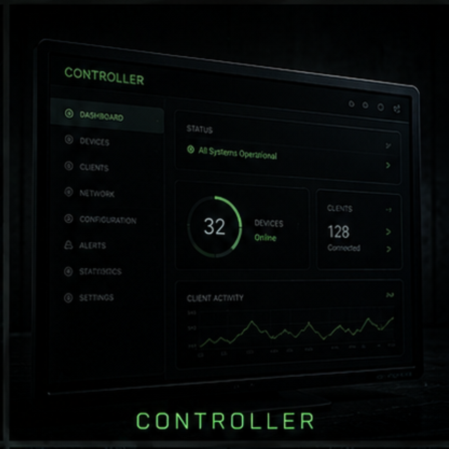
What is a network Controller
A network controller is a centralised software application or hardware device (such as a network interface controller or SDN controller) that manages, configures, and monitors network infrastructure. It acts as a central brain, automating tasks like traffic routing, security policy enforcement, and device configuration to improve network efficiency, performance, and scalability.
• Automation: Automates device operations, such as configuration updates, reducing manual tasks.
• Monitoring & Optimisation: Monitors network traffic and device status to ensure optimal performance.
• Visibility: Maintains an inventory of all network devices and their statuses.
• Security Enforcement: Applies security policies uniformly across the network.
• Troubleshooting: Identifies network issues and suggests or implements remediation.
In the context of Software-Defined Networking (SDN), the controller decouples the control plane from the data plane, allowing for more flexible network management.

Network Security
What Is Network Security Equipment?
Network security equipment is the hardware and specialised devices used to protect a computer network from unauthorised access, cyberattacks, malware, data theft, and other security threats.
Common types of network security equipment include:
Firewalls - Monitor and filter incoming and outgoing network traffic based on security rules.
Intrusion Detection Systems (IDS) - Detects suspicious activity and potential attacks on a network.
Intrusion Prevention Systems (IPS) - Detect and automatically block malicious traffic.
VPN Gateways - Create secure, encrypted connections for remote users and branch offices.
Secure Routers - Route network traffic while enforcing security policies.
Security Appliances - Dedicated devices that combine multiple security functions such as firewall, antivirus, and content filtering.
Web Application Firewalls (WAF) - Protect websites and web applications from attacks such as SQL injection and cross-site scripting.
Network Access Control (NAC) Devices - Control which devices can connect to a network based on security policies.
Email Security Gateways - Filter spam, phishing emails, and malicious attachments before they reach users.
Why is Network Safety Important?
Network safety, also known as network security, is essential because it protects computers, devices, and data from cyber threats and unauthorised access. It helps safeguard sensitive information by preventing the theft of personal, financial, and business data while keeping customer records, passwords, and other confidential information secure.
Network security also plays a critical role in preventing cyberattacks, including malware, ransomware, phishing, and hacking attempts, which reduces the risk of data loss and system compromise. In addition, it helps maintain business operations by preventing network outages and disruptions, ensuring that employees and customers can reliably access systems and services. Network safety protects user privacy by securing personal communications and online activities and helping to prevent identity theft and unauthorised surveillance. It also supports regulatory compliance, as many industries are required to follow security standards and laws designed to protect customer data. By reducing the likelihood of cyber incidents, network security can help organisations avoid costly recovery efforts, legal penalties, lost revenue, and damage to their reputation.
Furthermore, strong security measures build trust among customers and business partners by demonstrating responsibility and professionalism. For example, without network security, a hacker could gain access to a company's network, steal sensitive customer information, install ransomware, or disrupt operations. However, with security measures such as firewalls, encryption, antivirus software, and access controls in place, these risks are greatly reduced. Overall, network safety is vital because it protects data, users, and systems while ensuring secure and reliable communication across networks.